Arka case study
India's solar boom has a comprehension problem.
Every app shows the numbers.
None of them answer the question.
Solar monitoring apps were designed for the engineers who installed the system, not the people who paid for it. This case study is about a deliberate tradeoff: demoting raw monitoring and promoting homeowner confidence: what is working, what it means, and what to do next.
Average time for a homeowner to understand what their solar system is doing while using existing apps.
Could not answer basic performance questions from their monitoring app, even after months of use.
Could not find a specific data point without scrolling through multiple screens.
Called their installer not for technical problems, but to decode what the app was showing.
Major apps translated the primary metric into homeowner confidence at the point of reading.
Financial anxiety from raw metrics
"18.4 kWh" is accurate, but it does not answer whether the ₹3-5 lakh investment is saving money today.
Navigation designed for engineers
The information architecture followed inverter categories and technical logs, not homeowner questions.
The installer became the UI
When users cannot understand the interface, the installer becomes a human translation layer for basic product comprehension.
The missing feature was not more analytics. It was meaning.
The data was there.
The understanding wasn't.
Five methods. One question: where does technically correct information stop being useful to the person reading it? The research separated data depth from homeowner confidence because the problem was not whether the app had information, but whether the owner could act on it without translation.
Survey
Comprehension, navigation difficulty, and installer dependency across 78 homeowners.
Competitive audit
Four major solar monitoring apps reviewed for data depth, clarity, and actionability.
User interviews
Solar homeowners on monitoring habits, trust, savings, and disengagement.
Task testing
Could users answer basic questions from existing app structures?
App teardown
Where meaning is hidden behind metric labels, dashboards, and technical categories.
What homeowners actually need
When asked what they primarily want to know when opening the app, homeowners were unambiguous. The apps were built for engineers. The needs were financial and emotional.
Competitive audit
Evaluated against the five criteria homeowners said mattered most. The pattern was consistent across every app in the category.
| Criteria | SolarEdge | Enphase | Fronius | Luminous |
|---|---|---|---|---|
| Plain-language system status | ||||
| Savings in ₹, not kWh | ||||
| Actionable alert hierarchy | ||||
| Domestic vocabulary | ||||
| Performance context |
Independent validation
The pattern wasn't unique to Indian apps.
8 in 10 users misclicked on basic navigation tasks. Independent audit by a homeowner-designer.
~6 in 10 homeowners become passive app users within 6 months of installation.
In their own words.
"The data is there. The meaning isn't. Every morning I open the app and feel like I need a PhD just to understand if everything is working."
Homeowner · Ahmedabad · 2 yr solar user"I had no idea the panel output had dropped 40% over six months. I thought everything was fine. The app never told me anything was wrong."
Homeowner · Pune · 2.5 yr solar user"I want to feel like the system is working for me, not the other way around. I shouldn't have to decode it every time I open the app."
Homeowner · Ahmedabad · 3 yr solar user"I got told the app was fine to use. I just can't understand it. So I stopped checking. That can't be good."
Homeowner · Pune · 18 month solar userFrom finding to decision.
Research only matters if it changes the product. Each insight mapped directly to a structural design decision.
Data without meaning creates anxiety.
Accurate metrics were not enough. The same drop could mean weather variation, seasonal change, or a real fault.
Therefore: lead with status, not raw metrics. Every key number needs a plain-language sentence before interpretation is required.
Financial interpretation is the first user need.
Homeowners installed solar to save money, but apps foregrounded generation data instead of savings meaning.
Therefore: surface savings, bill impact, and ROI early. Technical detail follows financial meaning, not the other way around.
Installer calls are a symptom of UI failure.
The support call often replaced the app's job of explaining system state and next action.
Therefore: explain system state and action clearly. If the homeowner still needs to call, the design has failed.
Trust erodes over time.
Users didn't reject the app immediately. They stopped checking when repeated visits failed to build confidence.
Therefore: design for repeat reassurance. Every return visit should answer "still okay?" before anything else.
~65% of homeowners stop engaging with the app within 6 months.
The problem was not awareness. Homeowners knew the app existed. They stopped returning because repeated visits failed to answer anything quickly. CEEW · NREL · Secondary research
Therefore: design for the check-in, not the monitor. Every session should answer one question in under a minute, or the homeowner won't come back.
The primary reason homeowners open a solar monitoring app.
Time to confidence. Down from 18.
Check-in, not monitor. Short, purposeful, not anxious.
Reduction in comprehension time across 12 task sessions.
The data was never the problem.
The language around it was.
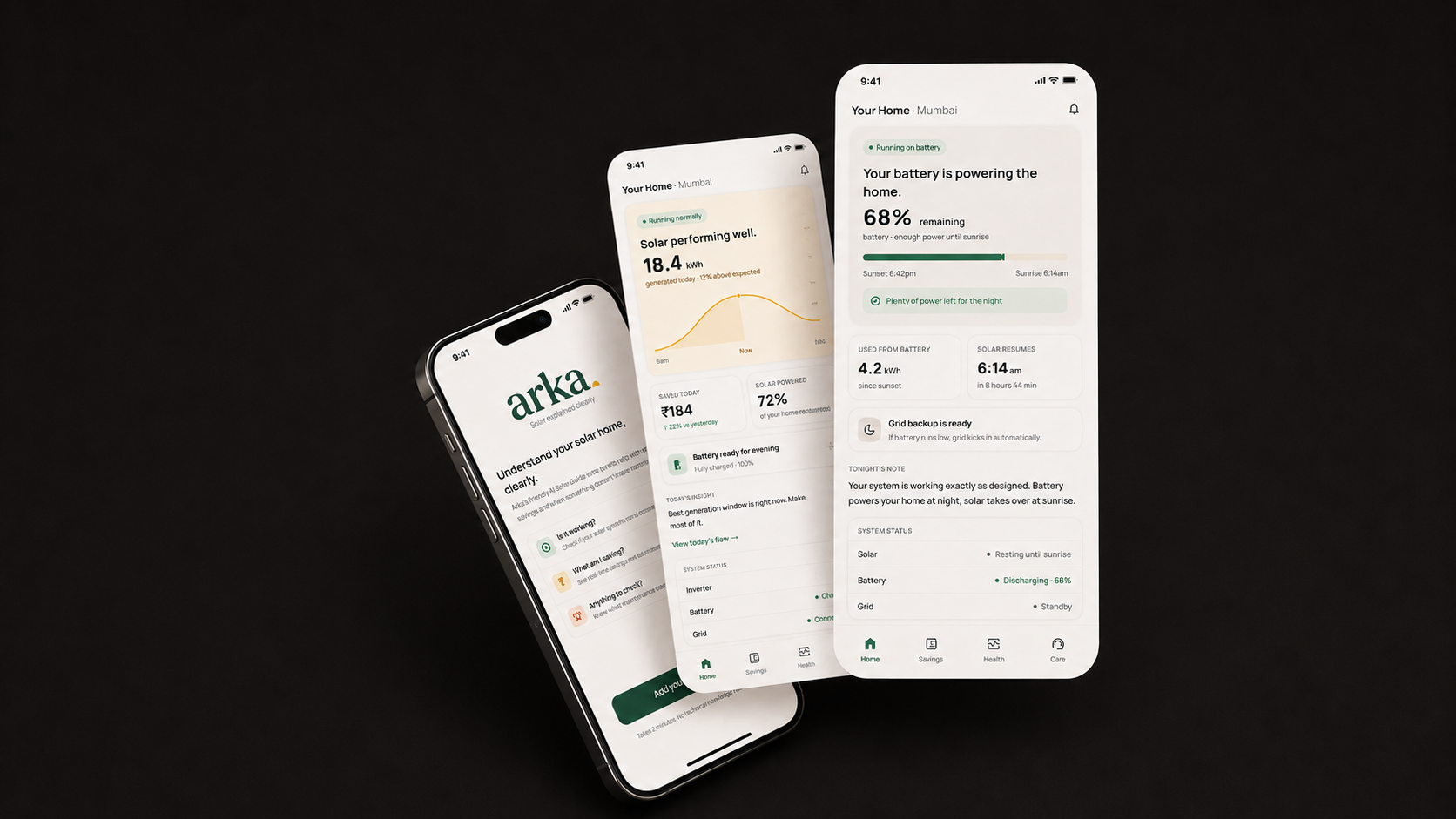
The product bet was to show less at first, not more. Arka does not ask homeowners to monitor solar like technicians. It decides which signal deserves attention, translates it into meaning, and keeps proof available for anyone who wants to go deeper.
Status before stats
Every screen opens with whether the system is okay, in plain language, before any number appears.
Meaning over metric
"Generated 12% above expected" comes before "18.4 kWh." The number supports the meaning, not the other way around.
Proof on demand
Technical detail is reachable in two taps for anyone who wants it. It is never the entry point.
Action when needed
If something needs attention, the app says so directly and tells the homeowner exactly what to do next.
Same data.
Different language.
The same inverter telemetry. The same kWh, the same alerts. The strategic choice was to stop treating data as the interface. Arka turns telemetry into a sequence homeowners can trust: status first, meaning next, proof on demand, action only when needed.
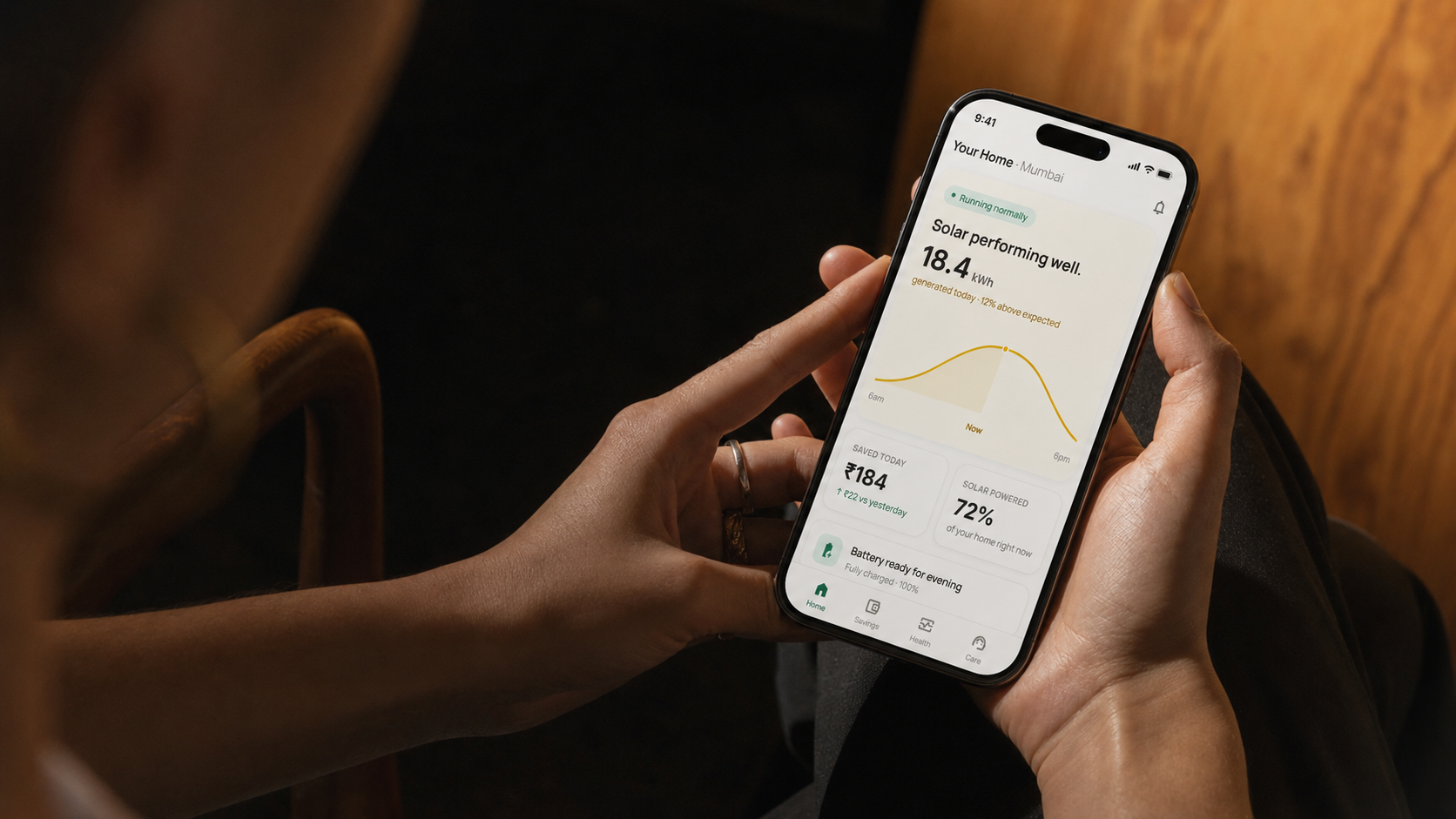
"18.4 kWh" becomes "Solar performing well."
The number stays. It moves below the meaning. A normalised comparison replaces the raw value as the visual anchor.
PR · 0.84
EXPORT · 4.2 kWh
"₹184 saved today" replaces "self-consumption ratio".
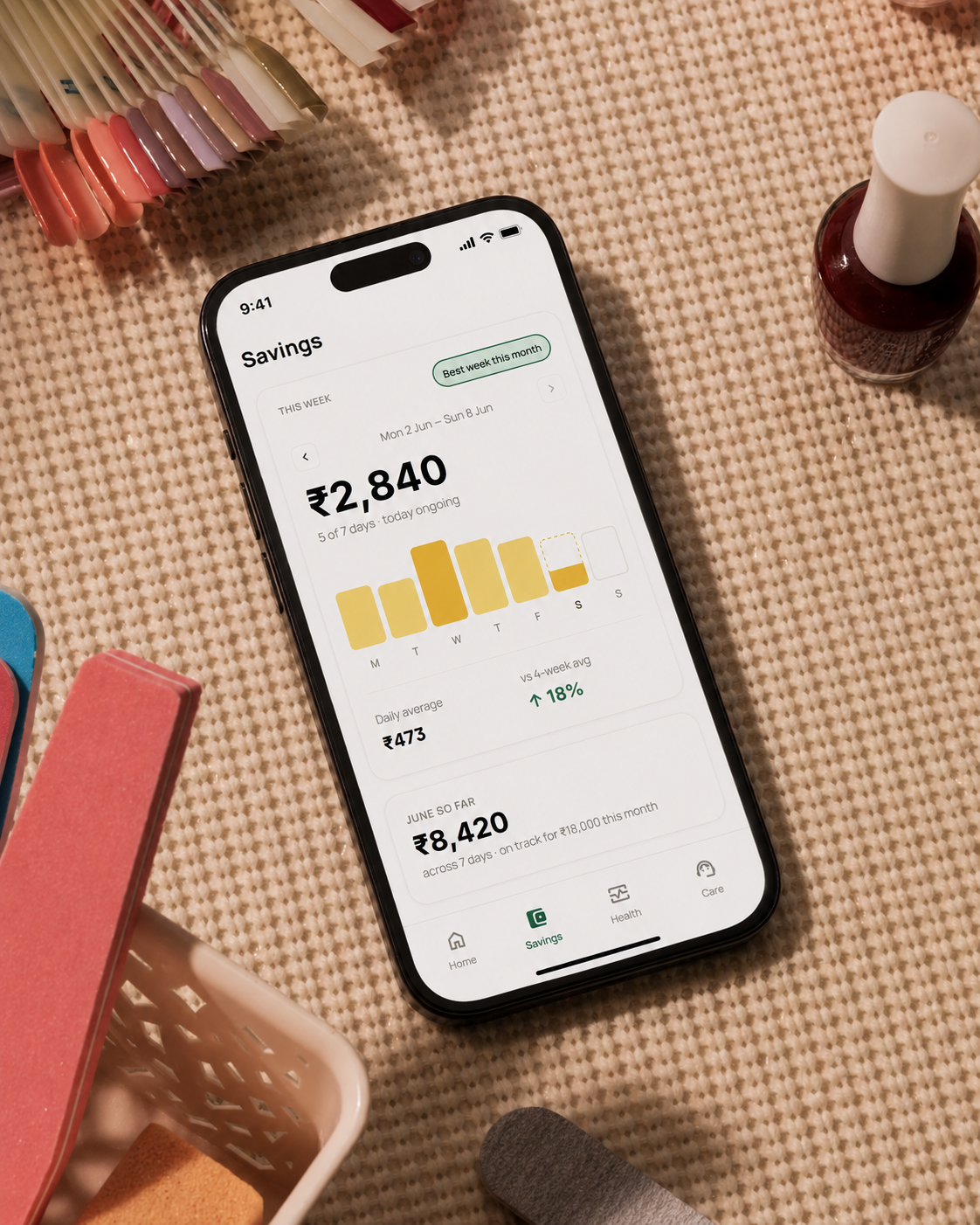
71% of users open the app to check savings. The new IA reflects that. Savings is a primary tab. kWh is supporting evidence inside it.
4.6 kWh CONSUMED
1.3 kWh EXPORTED
"Inverter offline" becomes a three-part diagnosis.
What happened, what it means for the user, and what to do, in that order. Critical for the alert hierarchy to do its job.
ERROR CODE · E-227
LAST PING · 03:42 AM
Four questions.
One answer per tab.
Scroll to see the full screen hierarchy.
A visual system for homeowner confidence.
Arka’s interface had to reduce monitoring anxiety, not make energy data feel more impressive. Warm surfaces keep the product domestic rather than technical, green anchors confidence, amber is reserved for solar evidence, and alerts are written as next steps instead of fault codes.
Solar performing well.
The first line answers “is everything okay?” before asking the homeowner to interpret any solar metric.
Generation data is paired with plain-language interpretation, so the number becomes reassurance instead of work.
Savings and solar-powered tiles act as evidence that the system is working and the investment is still paying back.
Running normally
High confidence, no action needed.
Needs attention
Explain issue before asking action.
Battery ready
Night confidence without solar anxiety.
Savings proof
Convert energy into bill meaning.
Service needed
Move from anxiety to next step.
Report ready
Ownership record, not hidden settings.
Three moments where the obvious answer was wrong.
Every project has decisions where the safe call would have produced a worse product. These are the three that mattered most.
The savings hero should be weekly progress, not payback.
A 5–7 year payback timeline is the most financially significant number in the app. It was also nearly impossible to design around without making every session feel like watching paint dry.
Therefore: use weekly progress as the hook. Payback exists one tap down, but the weekly card creates clear progress on a timescale humans actually feel.
Today's Insight sits flat on the page. No card.
Every other element on the Home screen is a card. The insight section is the only place the app uses plain prose directly on the background. This took five iterations to get right.
Therefore: let the words do the work. Removing the container keeps the insight from becoming another widget to scan and dismiss.
Three alert states, not two. Not four.
The first version had binary states: working or not working. The second had four severity levels. Neither was right.
Therefore: collapse severity into three behaviours. Normal, Watch, and Act were easier to understand because each state maps to one clear user response.
The app, explained screen by screen.
Four states. Four moments in a homeowner's day. Each screen answers one question.
Running normally.
The default state. Solar is working, savings are visible, nothing needs attention. This is what 91% of sessions look like.
Battery powering the home.
The night state. Solar is resting, battery is discharging. The app explains what's happening so the homeowner doesn't worry.
₹2,840 this week.
The Savings tab. The weekly card is the hero, with seven bars and today partially filled. A dashed outline shows that the day is still in progress.
₹1,360. Would have been ₹4,200.
The bill comparison screen is the most financially persuasive screen in the app. It shows what the homeowner actually paid compared with what they would have paid without solar.
The ones that tell the story.